· Manuel López Pérez · writeups · 6 min read
CyberH2O: Challenge 1 – OSINT in Critical Infrastructures
Write-up of the first challenge of the CyberH2O cyberchallenge, focused on OSINT to locate an exposed PLC in a specific municipality.
CyberH2O Cyberchallenge
[!IMPORTANT] 🏆 The Ironhackers team won the CyberH2O Cyberchallenge! 🏆
A few weeks ago, the Ironhackers team had the opportunity to participate in a CTF initiative: the CyberH2O cyberchallenge.
This competition was promoted by the Chair of Digitalization and Water Cybersecurity of INCIBE and the University of Girona. It is appreciated that they designed such real and technical scenarios, moving away from abstract challenges to immerse us in the real mud of water management.
The format was also different: 3 major challenges distributed over several weeks.
In this first installment, we bring you the writeup of the first challenge, purely focused on OSINT. From locating assets on Shodan to metadata searches, this is how we managed to obtain the first flags.
Challenge 1
Statement
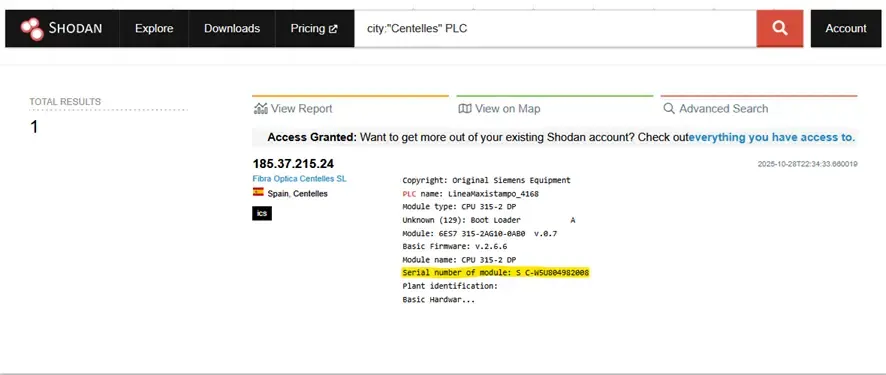
Find the serial number of a PLC exposed to the Internet in the municipality of Centelles. HACK{SN}
Solution
Shodan is a search engine for Internet-connected devices (servers, cameras, PLCs, routers, SCADA, etc.). It indexes banners and metadata that services expose (protocols, versions, identification texts), allowing you to locate assets and extract information that often does not require active interaction or exploitation.
First, we check if there are PLC devices in the municipality and, if we find a banner with the field Serial number (or similar).
The PLC publishes metadata for diagnosis/identification; Shodan indexes those banners.
Procedure
- We search on Shodan:
city:"Centelles" PLC. - We open the relevant result and look for the line Serial number of module in the banner.
- We build the flag with the found serial: HACK{
} and submit it.
Challenge 2: Geolocation of Infrastructures
Statement
The challenge is to obtain the GPS coordinates of the largest water treatment plant in Catalonia. The flag must follow the format HACK{lat,lon}, for example: HACK{42.6669506,1.3876056}.
Solution
To solve it, we performed open reconnaissance (OSINT). Information about public infrastructures is usually documented in news and official websites. The strategy was to locate the plant through web searches (Google and news media) and then extract its exact coordinates using Google Maps, which provides this data easily without the need for special tools.
Steps
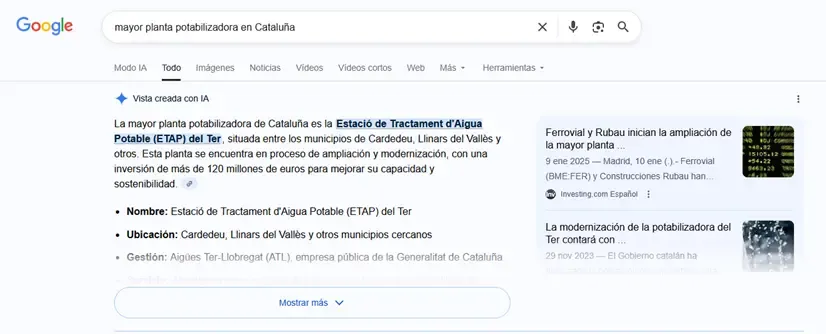
We search Google for the phrase “largest water treatment plant in Catalonia” and review articles to confirm the name and location. The sources indicated it was the ETAP del Ter.
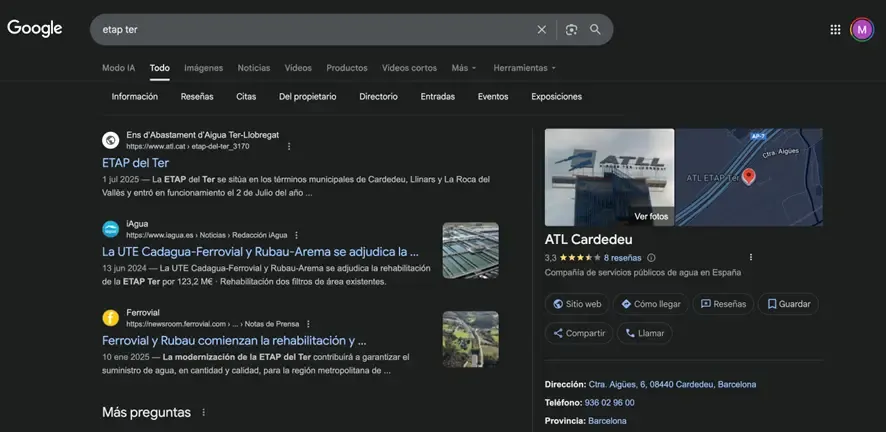
We open the location in Google Maps.
We extract the coordinates directly from the Google Maps URL, where they appear after the
@symbol in the format(@lat,lon).We format the flag with the exact coordinates with a precision of 7 decimals, as indicated by the example in the statement (
HACK{lat,lon}).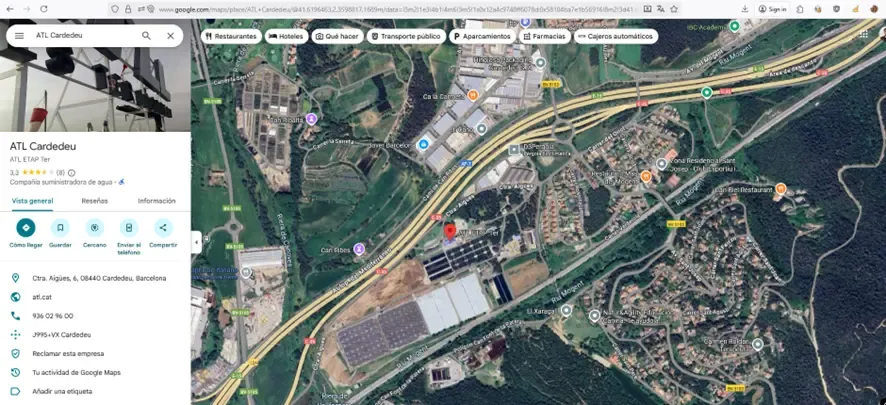
After some attempts, since we had some initial problems with this challenge, we got the correct flag.
Challenge 3: Document Tracking and MD5 Hash
Statement
The goal is to obtain the MD5 Hash of an important Spanish PDF that talks about IoT and water quality. The flag format is HACK{md5hash}.
Solution
We performed documentary OSINT to locate the file. The technique consists of using search operators in Google (filetype: + keywords) to filter results by file type. This is very useful for locating manuals, reports, and papers in PDF, DOCX, etc., without having to browse through multiple pages. Once located, we downloaded the document and calculated its MD5 hash locally.
Steps
- We search Google using the dork:
filetype:pdf IoT calidad agua
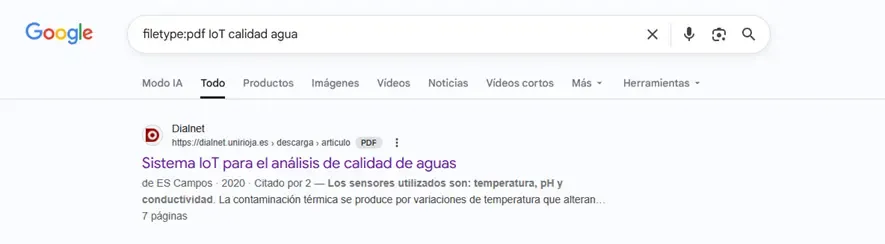
We open and download the relevant PDF on this subject, titled: “Sistema IoT para el análisis de calidad de aguas”.
We calculate the MD5 hash of the downloaded file. We can do this with web tools or directly with console commands as shown below:
- PowerShell:
Get-FileHash .\file.pdf -Algorithm MD5. - Linux/macOS:
md5sum file.pdf.

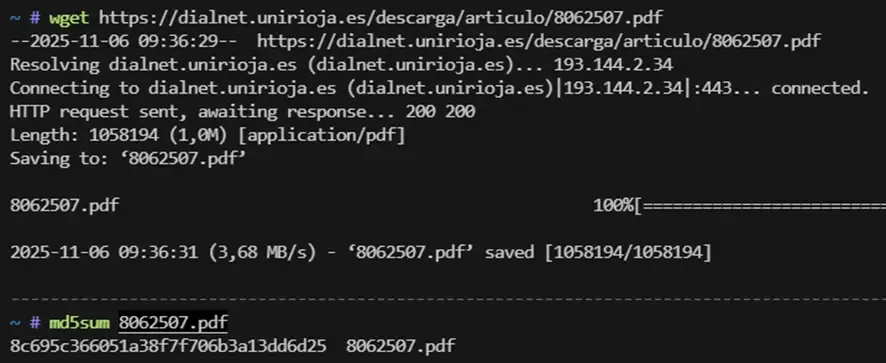
- We format the flag with the obtained MD5:
HACK{8c695c366051a38f7f706b3a13dd6d25}.
Challenge 4: RDP Telecontrol Server
Statement
Find in Spain a Telecontrol server with remote desktop enabled. The flag format is HACK{NetBIOS_Computer_Name}.
Solution
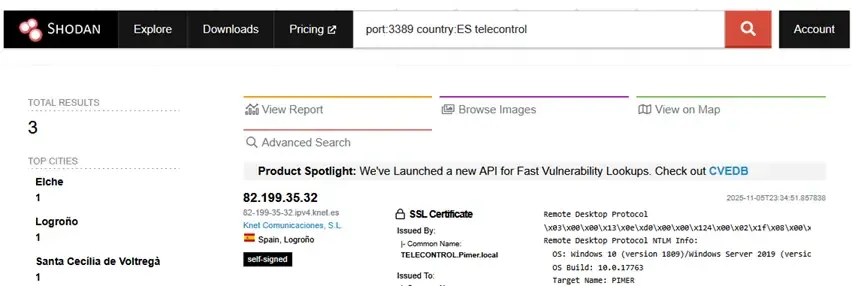
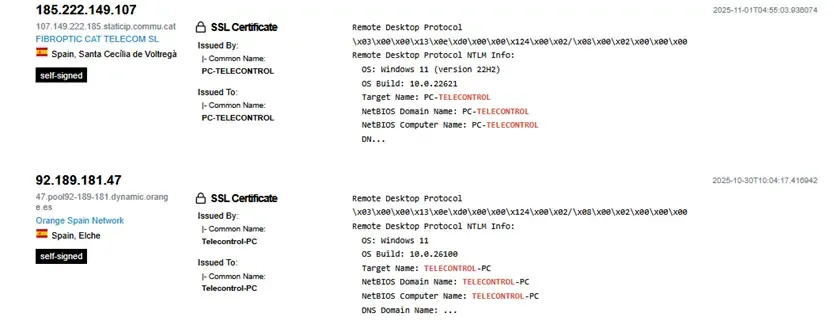
We performed passive reconnaissance with Shodan: we filtered by RDP port and by country along with the keyword “telecontrol” to locate hosts that publish metadata (certificates, NTLM banner) with NetBIOS information. If the banner includes NetBIOS Computer Name or Target Name, that string forms the flag.
Steps
We search on Shodan:
port:3389 country:ES telecontrol.We review the list of results and open the relevant records.
In the RDP banner or certificate, we look for the line NetBIOS Computer Name.
We build the flag with that value:
HACK{PC-TELECONTROL}.
Challenge 5: Web Archaeology and Wayback Machine
Statement
The administrator hid a flag on the page https://cyberh2o.es/2024-protegint-el-flux-vital-del-futur/.
Solution
To solve it, we searched for archived versions and/or the source code of the article and tracked variables or HTML/JS attributes containing the hidden flag. Administrators sometimes hide clues in the HTML or in old versions of the page (Wayback Machine). The archived content or the view-source itself is usually enough to retrieve variables like data-flag, data-… or comments containing the flag without interacting with the server.
Steps
- We open the target URL and the Inspector or the source code directly (with
Ctrl+U). We search for terms likeflag,data-flagordata-…. We observe the result:data-flag="__deleted__", a marker indicating it has been deleted.
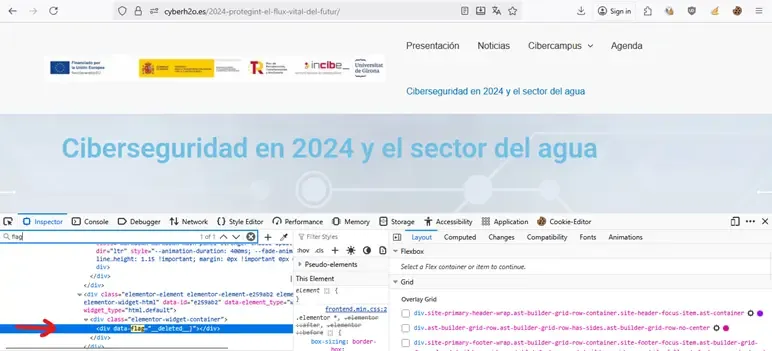
We go to Wayback Machine (archive.org/web) and look for snapshots of the same URL (
https://cyberh2o.es/2024-protegint-el-flux-vital-del-futur/).We open the most relevant previous snapshot and review the archived source code (
Ctrl+Uor Inspector).

- We extract the original value of the attribute (or variable) as it appears in the snapshot containing the flag.
Challenge 6: Secrets in DNS Records
Statement
The network administrator has left a secret in the domain where the website is hosted. The flag format is Hack{xxxx}.
Solution
For this challenge, we performed passive reconnaissance on the domain’s DNS. The technique consists of querying the TXT records of the subdomain or host, as administrators sometimes leave information in these records (comments, public keys, metadata, or even CTF flags). Querying DNS records is a passive and safe technique that does not modify anything on the target.
Steps
- We query the TXT DNS records of the subdomain
hackaton.cyberh2o.es. We can do this via the command line:
nslookup -type=TXT hackaton.cyberh2o.es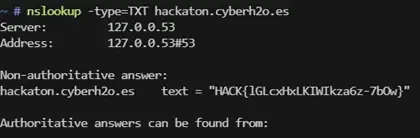
It is also possible to use web tools like DNS lookup or DNS checker to get the same result.
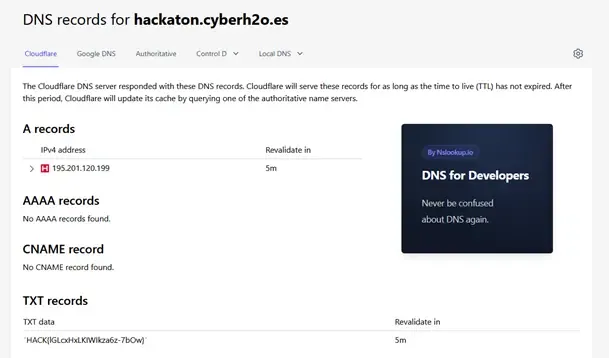
We review the output and check that the value of the TXT record contains the string with the flag.
We format and submit the flag according to the CTF pattern:
HACK{lGLcxHxLKlWlkza6z-7bOw}.
Challenge 7: Steganography and Metadata
Statement
A hacker has manipulated an image on the blog at https://cyberh2o.es/. The flag format is HACK{xxxxxxx}.
Solution
To solve this challenge, we searched the public WordPress API for media resources, downloaded the manipulated image, and extracted the metadata (XMP/Exif) containing a Base64 string. By decoding that string, we obtained the flag.
WordPress exposes /wp-json/wp/v2/media publicly and, often, attackers or challenge creators hide data in the metadata of images. Querying the API and reading these metadata is a sufficient passive technique to retrieve the information.
Steps
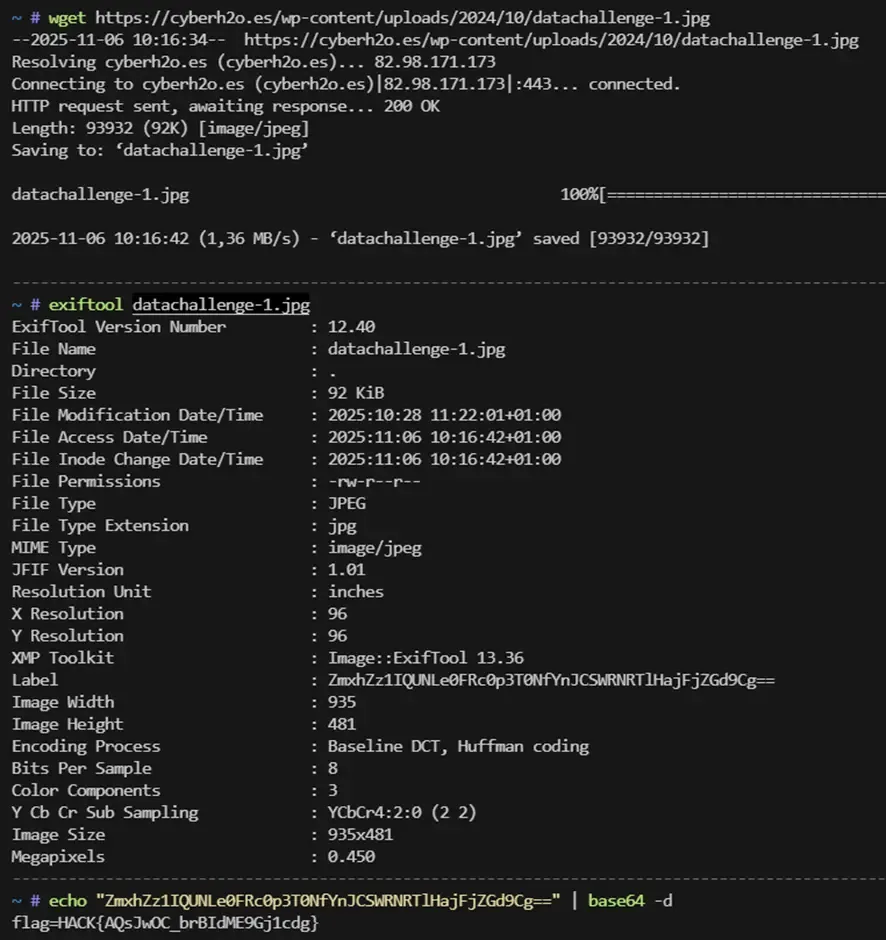
- We list the media via the WP REST API. We detected that the last two images have the same base name: “datachallenge.jpg” (from 27/10) and “datachallenge-1.jpg” (from 28/10). The name “datachallenge-1.jpg” suggests it is a modification of the original image.
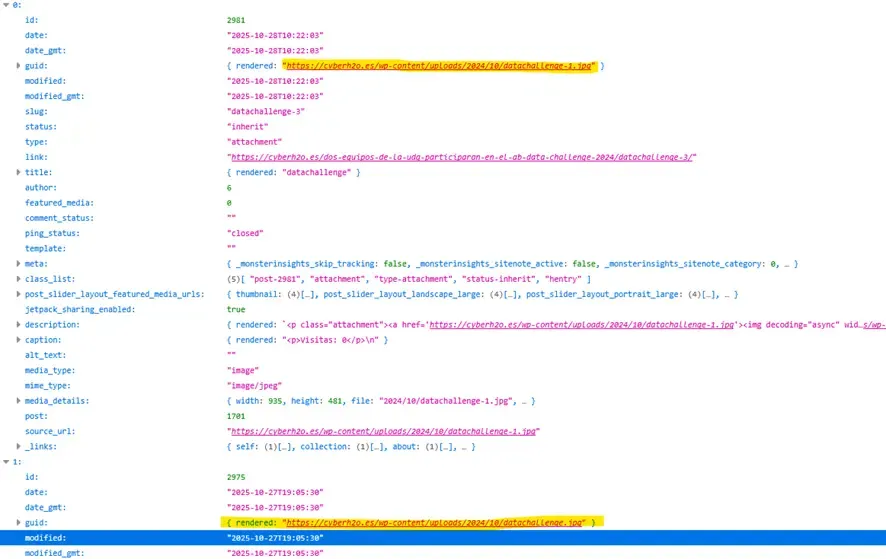
- We download the identified image (
datachallenge-1.jpg) withwget.
wget https://cyberh2o.es/wp-content/uploads/2024/10/datachallenge-1.jpg -O datachallenge-1.jpg- We inspect the metadata with
exiftoollooking for fields containing useful information.
exiftool datachallenge-1.jpg- We find a Base64 string in the metadata, decode it, and obtain the flag.
echo "ZmxhZz1IQUNLe0FRc0p3T0NfYnJCSWRNRTlHajFjZGd9Cg==" | base64 -dFlag: HACK{AQsJwOC_brBIdME9Gj1cdg}